ElasticPress 5.3.3 and ElasticPress Labs 2.5.1 are out, with a new pagination option for Instant Results and a couple of refinements to the AI features we shipped in the previous cycle.
Numbered pagination for Instant Results
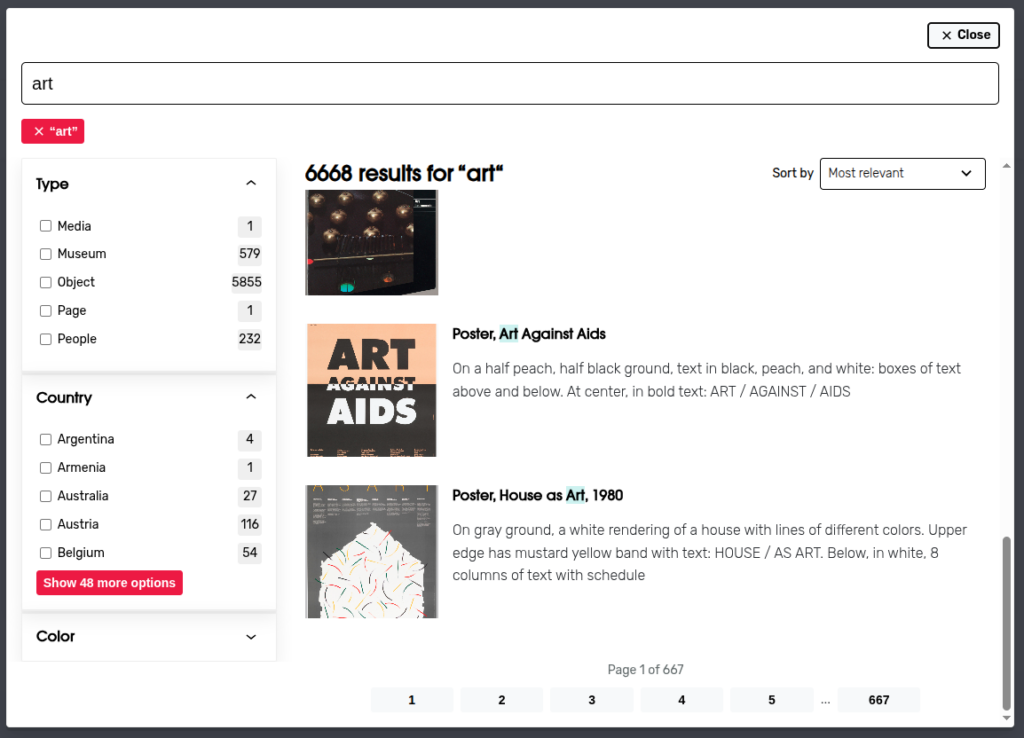
Until now, Instant Results has always displayed pagination with single previous and next links. That works well for content discovery, but it is not always the right fit. Some sites prefer the predictability of numbered pages, especially when visitors are scanning a long list of products or articles and want to jump ahead, share a link to a specific page, or come back to where they left off.
ElasticPress 5.3.3 introduces a numbered pagination option for Instant Results. You can enable it in the Instant Results feature settings and let your visitors move through results page by page, with the page number reflected in the URL.
Refinements to the AI features in ElasticPress Labs
With the AI-related features introduced in ElasticPress Labs 2.5.0, we wanted to spend this cycle making them more resilient and easier to reason about. ElasticPress Labs 2.5.1 brings two changes in that direction.
The first one is about failure handling. Calls to an external AI provider can fail for many reasons: a network blip, a quota issue, or a temporary outage on the provider side. When that happens repeatedly, continuing to retry on every page load only adds latency and noise to your error logs. ElasticPress Labs now disables AI features automatically after three consecutive failures within an hour, so a misbehaving provider does not slow down your site. Once the underlying problem is resolved, you can re-enable the features from the settings page. You can use the new ep_max_failures_count and ep_max_failures_timeframe filters.
The second change is a clearer message about feature compatibility. Semantic Search relies on vector embeddings and works on a different code path than the one used by Autosuggest and Instant Results, which means the three cannot be used together at the moment. Instead of letting that surface as confusing behavior, the Semantic Search settings now display an explicit notice when Autosuggest or Instant Results is active, so site administrators know what to expect before turning the feature on.
And the usual maintenance work
Both releases also include a number of smaller fixes and adjustments: PHP warnings cleaned up, a few edge cases addressed in the admin UI, and dependency updates on the security side. None of these are headline changes, but together they keep the plugins healthy and predictable on the wide range of WordPress setups they run on.